Professional Typing: WPM Benchmarks & Strategies
In today's digital workplace, every WPM (Words Per Minute) you gain directly translates to time saved and productivity unlocked. While you might know your general WPM score, professionals often overlook a critical question: Is your typing speed truly optimized for your specific career? A generic score doesn't tell the whole story. The demands on a writer are vastly different from those on a programmer or a data entry specialist.
This guide explores professional typing benchmarks across various industries. We will uncover what a "good" WPM score looks like for your job and provide tailored strategies to help you improve. Once you know where you stand against professional benchmarks, you can create a targeted plan to boost both speed and accuracy. Before we dive in, it’s helpful to know your starting point. You can check your baseline with a quick and free test.

Industry-Specific WPM Benchmarks: How Do You Compare?
A good WPM score is not one-size-fits-all. It varies significantly based on the tasks, vocabulary, and accuracy required by a profession. Here’s a breakdown of typical professional typing benchmarks to help you see how you measure up.
WPM for Writers & Content Creators: Crafting Speed with Precision
For writers, editors, and content creators, typing is the primary tool for shaping ideas into clear narratives. Speed helps meet deadlines, but it must be balanced with high accuracy to minimize editing time.
- Average Speed: 60-80 WPM
- Target Accuracy: 97% or higher
- Key Challenge: Maintaining a consistent rhythm and flow of thought while typing. The goal is to let your fingers keep up with your brain without sacrificing precision. A high error rate can disrupt the creative process and lead to extensive revisions.
Coding Efficiency: What's a Good WPM for Developers?
A single typo can break an entire block of code. For developers who work with complex syntax including symbols, numbers, and special characters, raw WPM is less critical than accuracy and familiarity with shortcuts.
-
Average Speed: 45-60 WPM
-
Target Accuracy: 99% or higher
-
Key Challenge: The frequent use of non-alphabetic characters (
(),{},;,>) slows down traditional typing speed. Coding efficiency techniques focus more on minimizing keystrokes through IDE shortcuts, autocompletion, and error-free syntax entry.

Data Entry & Administrative Roles: Speed Requirements for Accuracy
In data entry, transcription, and administrative roles, speed and accuracy are paramount. These positions often involve inputting large volumes of numerical and textual data where mistakes can be costly.
- Average Speed: 70-90 WPM
- Target Accuracy: 98% or higher
- Key Challenge: The work is often repetitive and requires sustained focus. High-speed typing must be maintained over long periods, making both speed and endurance crucial. Proficiency with the number pad is also a significant advantage.
Beyond the Keyboard: Specialized Roles & Unique Typing Needs
Many other professions have unique typing demands. A lawyer drafting a contract needs to type complex legal terms accurately. A customer service representative must type quickly and conversationally while multitasking. A pharmacist needs precision when entering medication names. Each role has its own informal benchmark, emphasizing a specific blend of speed, accuracy, and specialized vocabulary.
Tailored Training Strategies for Industry-Specific WPM Improvement
Knowing the benchmark for your field is only half the battle. Achieving it requires targeted practice. Generic typing tests are a good start, but industry-specific WPM training will deliver the best results. Here are strategies tailored for different professional needs.
Enhancing Typing Skills for Writers: Focus on Flow & Vocabulary
Writers need to build endurance and a seamless connection between thought and text.
- Practice with Long-Form Text: Instead of short bursts, practice typing entire articles or chapters from books. This builds stamina and helps you maintain focus over time.
- Build a Custom Dictionary: Identify words or phrases you frequently misspell and create practice drills around them.
- Focus on Rhythm: Use a metronome or rhythmic music to develop a consistent typing pace. This helps reduce errors caused by rushing and improves muscle memory.
Mastering Coding Efficiency Techniques: Symbols, Shortcuts & Syntax
For developers, practice should go beyond plain English. The goal is to make typing code as natural as typing a sentence.
- Practice with Code Snippets: Use actual code from languages you work with (like Python, JavaScript, or C++) for your typing exercises. Focus on accurately typing symbols and indentation.
- Drill Common Symbols: Dedicate practice sessions to typing brackets, parentheses, semicolons, and other common programming characters without looking at the keyboard.
- Learn Your IDE: Master the keyboard shortcuts for your Integrated Development Environment (IDE). This is often more impactful than increasing your raw WPM.
Boosting Data Entry Typing Speed: Number Pads & Repetitive Patterns
Data entry professionals thrive on repetition and muscle memory. Your training should reflect that.
- Master the 10-Key Number Pad: If your job involves numbers, dedicated practice with the number pad is essential. It is significantly faster than using the number row.
- Practice with Spreadsheets and Forms: Simulate your work environment by practicing with sample data sets, focusing on quickly moving between fields using the Tab key.
- Focus on High-Frequency Words: Create drills using the most common words and phrases found in your work to improve automaticity.
Leveraging Custom Practice for Personalized Progress
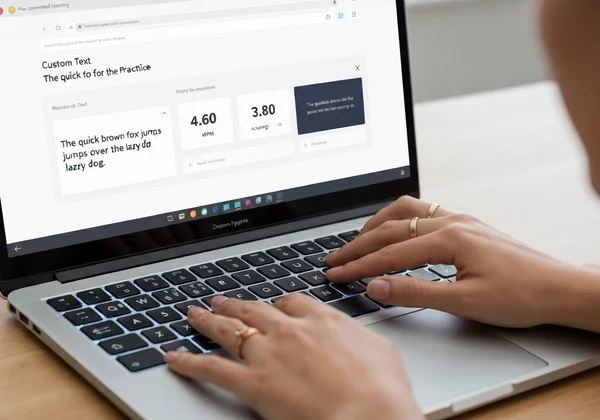
The single most effective way to improve is to practice with text that mirrors your daily work. This is where a customizable tool shines. By pasting in your own material—whether it's a legal brief, a piece of code, or a medical report—you train your fingers on the exact vocabulary and patterns you need to master. This method of custom practice ensures your training is 100% relevant to your professional goals.
Optimizing Your Typing Environment for Professional Performance
Your typing speed isn't just about your fingers; it's also about your setup. An optimized environment can prevent strain, reduce errors, and make long typing sessions more comfortable and productive.
Ergonomic Setup: Preventing Strain for Long Typing Sessions
A poor setup can lead to discomfort and repetitive strain injuries (RSI), which directly harm your typing performance.
- Chair and Desk Height: Sit with your feet flat on the floor and your knees at a 90-degree angle. Your elbows should also be at a 90-degree angle, with your wrists straight and not bent upwards or downwards.
- Monitor Position: Place your monitor at arm's length, with the top of the screen at or slightly below eye level.
- Take Regular Breaks: Follow the 20-20-20 rule: every 20 minutes, look at something 20 feet away for 20 seconds. Stand up and stretch every hour.
The Role of Keyboards: Mechanical vs. Membrane for Professionals
The keyboard you use can make a significant difference. The two main types are membrane and mechanical.
- Membrane Keyboards: These are quiet and common in offices. They require a full press to register a key, which can sometimes feel "mushy."
- Mechanical Keyboards: Preferred by many typists and programmers, these keyboards provide tactile feedback and a distinct "click." Different switch types offer varying levels of resistance and sound, allowing for a highly customized feel that can improve both speed and accuracy.
Integrating Shortcuts & Automation for Ultimate Efficiency
The fastest way to type something is to not type it at all. Learning and using keyboard shortcuts for your operating system and primary applications can save you thousands of keystrokes a day. Additionally, text expansion tools (like AutoHotkey or TextExpander) can automatically type out long phrases, email signatures, or code blocks when you enter a short abbreviation.
Elevate Your Career: Commit to Professional Typing Mastery
Mastering professional typing isn't just about speed—it's about gaining a competitive edge in your field and reclaiming valuable hours. It's not about hitting an arbitrary WPM number; it's about enhancing your efficiency, reducing errors, and freeing up valuable time for more critical tasks. By understanding your industry's benchmarks, adopting tailored training strategies, and optimizing your workspace, you can turn a basic skill into a powerful professional asset.

Don't guess where you stand. Find out your exact WPM and accuracy score right now. Test your typing speed and get the baseline you need to start your journey toward professional mastery.
Frequently Asked Questions About Professional Typing
What is considered a good WPM score across various professions?
A good score is relative. For administrative and data entry roles, 70-90 WPM is considered excellent. For writers and transcriptionists, 60-80 WPM is a strong benchmark. Programmers can be highly effective at 45-60 WPM due to the complex nature of code. The key is to exceed the average for your specific field while maintaining high accuracy.
How can I effectively improve my typing speed for specific professional tasks like coding or data entry?
The most effective method is targeted practice. Instead of generic text, use materials from your actual job. For coding, practice with code snippets from GitHub. For data entry, use sample spreadsheets. For legal work, use paragraphs from contracts. This builds muscle memory for the specific terms, symbols, and formats you use daily.
Is 70 WPM a competitive typing speed for most professional roles today?
Yes, 70 WPM is a competitive speed for the vast majority of professional roles. It places you well above the average typist (who is around 40 WPM) and demonstrates a high level of efficiency. For roles that are extremely typing-intensive, such as transcription or data entry, aiming for 80+ WPM would provide an even stronger competitive edge.
How does WPMTest.cc help me practice with profession-specific texts?
WPMTest.cc is designed for personalized training. While we offer standard tests, our key advantage is the custom text feature. You can simply copy any text—a block of code, a legal document, a chapter from a book, or a company report—and paste it into our test interface. This allows you to take a WPM test online using material that is directly relevant to your job, making your practice sessions incredibly effective.